Wedding Lead Management Software Built for Professional Planners
Capture inquiries with a branded form on your website, track every lead through a clear pipeline, message prospects with your branded signature, and convert them to clients in one place.
Start Free TrialYour entire lead pipeline in one workspace
From the moment a couple submits your inquiry form to the moment they sign a contract — every step happens inside NueViews.
What is wedding lead management software?
Wedding lead management software captures inquiries from potential clients and tracks them until they book. NueViews gives you a custom inquiry form, one inbox for all leads, pipeline tracking, automatic reply emails, messaging, and one-click conversion of an accepted proposal into a client.
A Branded Inquiry Form That Captures the Right Details
Configure your public inquiry form with your brand color, intro text, required fields, and custom questions. Embed it on your website or share your public form URL so submissions arrive in the Lead Inbox with the details you need.
See Every Inquiry in a Clear Lead Pipeline
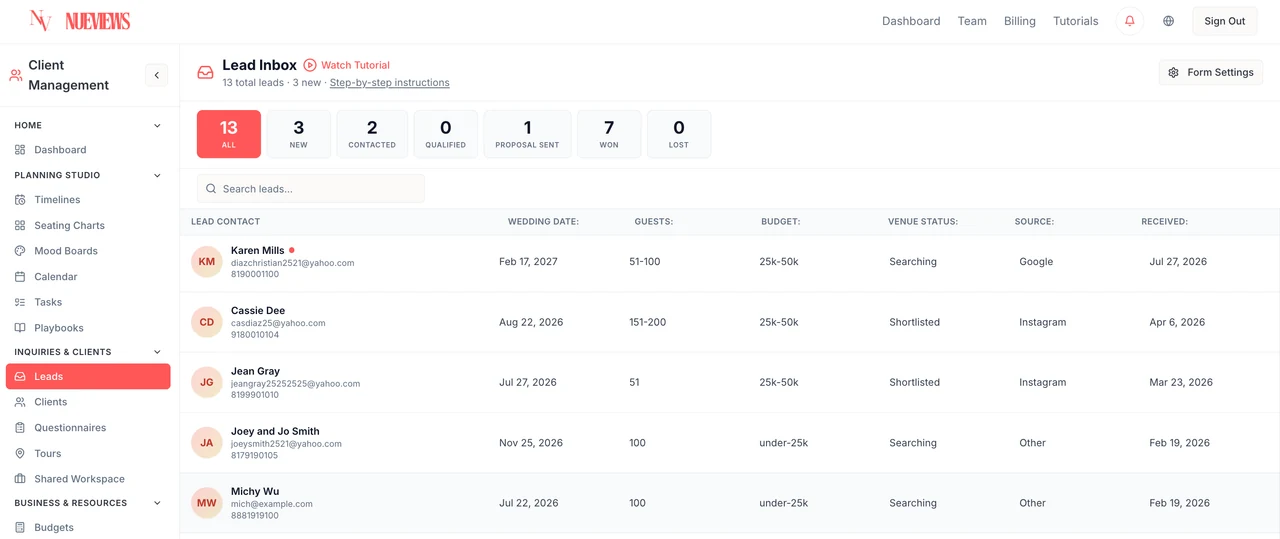
Keep wedding date, guest count, budget range, venue status, source, and custom answers with each inquiry. Move leads through New, Contacted, Qualified, Proposal Sent, Won, and Lost stages.
Reply, Send Proposals, and Convert from the Lead Record
Send messages with your branded signature, attach files, send questionnaires, or use an AI draft from the lead's message thread. Send a proposal from the lead record or convert the lead to a client manually.
Turn inquiries into organized client relationships.
Start Your Free TrialExplore the wedding planning CRM · See all wedding planner software features
Frequently Asked Questions
How does the lead inquiry form work?
NueViews gives you a public inquiry form at your own URL (e.g. /inquire/your-name). You configure the form fields — phone number, event date, estimated guest count, venue status, budget range, how they heard about you — and choose which are visible and which are required. When someone submits the form, the lead appears instantly in your Lead Inbox with all their details pre-filled.
Can I embed the inquiry form on my own website?
Yes. Every inquiry form includes an iframe embed code you can paste into any website builder — Squarespace, Wix, Showit, and others. The form blends seamlessly with no background. Leads submitted through your website land directly in your NueViews Lead Inbox.
Can I add custom questions to the inquiry form?
Yes. Beyond the standard fields, you can add custom questions — including multiple-choice questions with your own answer options. For example, you can add an 'Event Type' question with options like Wedding, Vow Renewal, Corporate Event, and Other. Answers appear on the lead's detail page.
Does NueViews send an automatic response when someone submits the form?
Yes. You can turn on an Auto-Response Email with a custom message. When a lead submits your inquiry form, they receive your message automatically — confirming their submission and setting the tone for the relationship before you've even seen the inquiry.
What lead pipeline stages does NueViews track?
Each lead moves through stages: New, Contacted, Qualified, Proposal Sent, Won, and Lost. You update the status from a dropdown inside the lead's record. Your Lead Inbox shows a count per stage at the top so you can see the health of your pipeline at a glance.
Can I message leads directly from NueViews?
Yes. Each lead has a Messages tab where you can send emails directly from NueViews. Your email signature — including your name, title, company name, and logo — is included automatically. You can also use 'Draft with AI' to generate a reply, attach files, or send a questionnaire from within the same thread.
How do I convert a lead into a client?
Two ways: you can send a proposal directly to the lead — if they accept, they become a full client automatically with no manual step required. Or you can click 'Convert to Client' manually from the lead's detail page to convert them at any point.
Can I schedule a consultation from a lead record?
Yes. Each lead has a 'Schedule Consultation' button that lets you book a consultation directly from the lead's page — keeping all your lead activity in one place.
What lead source tracking does NueViews support?
Leads can be tagged with a source — Google, Instagram, referral, and other channels. Source is collected via the inquiry form's 'How Did You Hear About Us' field and displayed on every lead record so you know which channels are actually generating bookings.